


How to use static URLs for applications and pages
Learn how to configure stable, readable URLs for your applications and pages in Bonita UI Builder.
-
Difficulty: beginner
-
Prerequisites: have an application on Bonita UI Builder
-
Estimated time: 5 minutes
| This feature is available starting from UI Builder version 1.3.10. |
What are static URLs?
By default, UI Builder generates URLs that contain auto-generated identifiers. These identifiers can change when an application is renamed, redeployed, or moved to another environment, which makes URLs hard to share and unreliable over time.
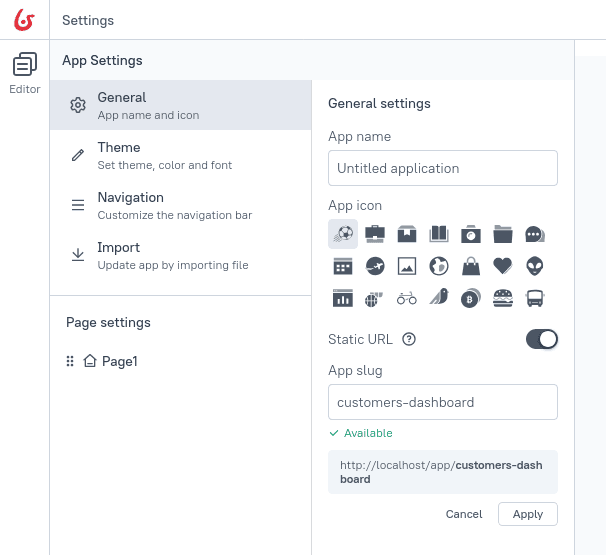
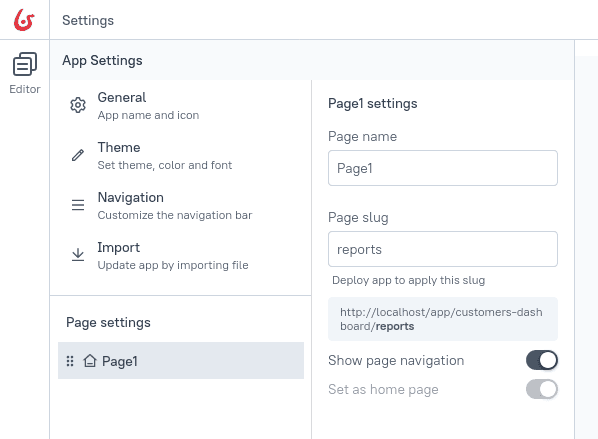
Static URLs replace these generated identifiers with human-readable slugs (short, URL-safe labels) that you control.
For example, instead of a URL like /app/untitled-application/page-3f2b7c91, you get /app/customers-dashboard/reports.
Benefits
-
Stable: URLs remain the same across edits, deployments, and environment changes.
-
Readable: Descriptive slugs make URLs easy to understand and share.
-
Backward-compatible: The URL to the home page of the application (for example,
/app/untitled-application) continues to work alongside the new static URL, so existing bookmarks and links are preserved. -
Consistent across environments: Static URL settings are preserved during application import and Git synchronization.
Keep slugs short, descriptive, and lowercase. Use hyphens for multi-word names (for example, customers-dashboard).
|
To go further
Bonita UI Builder is built on top of Appsmith. For the full step-by-step guide on customizing slugs and understanding how static URLs behave across renames, deployments, and imports, refer to the Appsmith documentation on static app URLs.