


AI connectors
Bonitasoft AI connectors let you integrate advanced language models like OpenAI, Anthropic, Google Gemini, Mistral, Azure AI Foundry, Ollama, DeepSeek, Groq, and Cohere into your business processes. These connectors support three powerful use cases:
-
Generate text content from custom prompts
-
Classify documents into predefined categories
-
Extract structured data from unstructured text or images
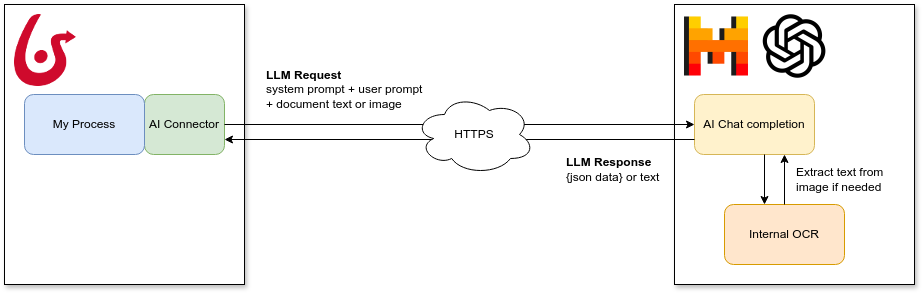
By securely sending data from your processes to LLMs over HTTPS, you can enhance automation, improve decision-making, and streamline information handling—all without writing custom code.
The Bonita AI Connectors are available for Bonita 10.2 Community (2024.3) version and above.
Supported providers:  OpenAI |
  Anthropic |
  Gemini |
  Mistral |
  Azure |
  Ollama |
  DeepSeek |
  Groq |
  Cohere
Getting started
To use a connector, add it as an extension dependency to your Bonita project. Choose the one related to your AI provider:
-
OpenAI — GPT-4o and GPT models
-
Anthropic — Claude models with vision support
-
Google Gemini — Fast and cost-effective, large context
-
Mistral AI — EU-hosted, GDPR-friendly
-
Azure AI Foundry — Enterprise compliance with Azure AD
-
Ollama — Local/on-premise LLMs, no API key needed
-
DeepSeek — Cost-effective AI with chain-of-thought reasoning (R1)
-
Groq — Ultra-fast LPU inference, 10-100x faster than GPU providers
-
Cohere — Enterprise RAG with citations and multilingual support
| Image documents are not supported yet for the Mistral connector due to a limitation of the underlying library. |
Connection configuration (shared parameters)
All AI connectors share these connection parameters regardless of the provider. See each provider page for provider-specific details.
| Parameter name | Required | Description | Default value |
|---|---|---|---|
apiKey |
false |
The AI provider API key. Parameter is optional for testing purpose but obviously required with official endpoints. The connector will look for API key value in this order:
And at last it will use a dummy default |
changeMe |
url |
false |
The AI provider endpoint url. This parameter allows to use an alternate endpoint for tests or custom deployments. |
Default to the official provider endpoint if not specified. |
requestTimeout |
false |
The request timeout in milliseconds for AI provider calls. |
null |
chatModelName |
false |
The model to use for chat. See each provider page for details. |
|
modelTemperature |
false |
The temperature to use for the model. Higher values will result in more creative responses. Must be between Leave blank if the selected model does not support this parameter. If the parameter is not present, the temperature will not be set in chat context. |
null |
Operations overview
AI connectors support three operations. See each provider page for detailed input/output parameter tables and JSON examples.
Ask
Take a user prompt and send it to the AI provider then return the response. The prompt text can ask questions about a provided process document. Supports optional JSON schema for structured output.
Choosing the right provider
| Criteria | Recommended Provider | Why |
|---|---|---|
Best general-purpose reasoning |
Strong at complex analysis, extraction, and generation |
|
Cost-sensitive batch processing |
DeepSeek V3 is 10-70x cheaper than GPT-4o with comparable quality |
|
Data sovereignty / on-premises |
Ollama (local) |
Data never leaves your infrastructure |
Enterprise compliance (Azure AD) |
Integrates with existing Azure security policies |
|
Fast classification and routing |
Groq delivers ~500 tokens/sec, ideal for real-time classification |
|
Document understanding with images |
Native multimodal support |
|
Complex legal and compliance analysis |
Anthropic ( |
Excellent instruction following and nuanced reasoning |
EU data residency |
European hosting, GDPR-compliant infrastructure |
|
Multi-language content |
Best multilingual capabilities |
|
Auditable AI decisions with reasoning |
DeepSeek ( |
Chain-of-thought reasoning with visible thinking process |
Ultra-low latency inference |
Groq ( |
Sub-200ms responses for real-time user-facing features |
RAG with citations and grounding |
Cohere ( |
Grounded answers with automatic source citations |
Model comparison
| Provider | Default Model | Context Window | Strengths | Cost Tier |
|---|---|---|---|---|
|
128K tokens |
Versatile, multimodal, strong coding |
Medium |
|
|
200K tokens |
Instruction following, long documents, safety |
Medium |
|
|
1M tokens |
Speed, large context, multimodal |
Low |
|
|
128K tokens |
European hosting, efficiency, open-weights option |
Low-Medium |
|
(deployment-based) |
128K tokens |
Enterprise compliance, Azure AD integration |
Medium-High |
|
|
128K tokens |
Free, on-premises, full data control |
Free (hardware cost) |
|
|
64K tokens |
Cost-effective, chain-of-thought reasoning (R1) |
Very Low |
|
|
128K tokens |
Ultra-fast inference (~500 tok/sec), LPU hardware |
Low (free tier available) |
|
|
128K tokens |
RAG with citations, multilingual, enterprise-grade |
Medium |