


Release Notes
UI Builder 1.3.12 (2026-04-23)
Improvements
-
Upgrade Appsmith from v1.95 to v1.98.
-
MongoDB (27017) and Redis (6379) ports are now reserved in
UIB_INTERNAL_PORT, preventing accidental conflicts with internal services. -
Invalid values provided for
UIB_INTERNAL_PORTare now rejected at container startup to catch misconfiguration early.
Bug fixes
-
Fixed an issue where applications created or imported via the REST API did not benefit from ETag/304 HTTP caching, which could cause unnecessary data transfers for API consumers.
-
Fixed a container startup failure when application data is stored in bind-mounted Docker volumes, caused by a missing
git safe.directoryconfiguration. -
Fixed an issue where the RTS server could fail to start due to missing executable permissions on its startup script.
UI Builder 1.3.11 (2026-03-10)
-
Fixed static URL feature not working in environment created before UI Builder 1.3.10
-
Fixed logout not working in editor
UI Builder 1.3.10 (2026-03-02)
This release activates new Appsmith features:
-
Custom slugs can now be assigned to applications and pages for stable, shareable URLs that persist across deployments and environments. See Static URLs for details.
-
The viewport dimensions are now exposed through the
appsmith.uiproperty, letting you conditionally adapt the layout or hide widgets based on the device viewport (e.g., mobile vs desktop). See Create Fully Responsive Applications for details.
UI Builder 1.3.9 (2026-02-19)
New features
-
Add configuration internal port (
UIB_INTERNAL_PORT) to allow deployment on platforms where a sidecar proxy occupies port 80 (e.g., Kubernetes with Istio or Linkerd)
Bug fixes
-
Fix "Save into project" action exporting applications
UI Builder 1.3.8 (2026-02-12)
-
Fixed an issue in production mode that prevented importing applications via the API, introduced in version 1.3.7.
Security fixes
-
CVE-207: netty-codec - Netty’s BrotliDecoder is vulnerable to DoS via zip bomb style attack (public CVE-2025-58057)
UI Builder 1.3.7 (2026-02-09)
-
Upgrade Appsmith from 1.93 to v1.95
-
BPA-296: Restore "Custom" widget in the widget list after a regression in 1.3.6 version
-
BPA-292: Fix memory leak caused by HTTP client instances not being released, which could lead to Out-Of-Memory errors on long-running pods
Two new UI Builder Rest API for managing applications
In this release we are adding a two new REST API, that lets you automatize some UI Builder actions with HTTP requests:
-
Delete single application
-
Update an application
Security fixes
-
CVE-225: Node.js - Improper Handling of Windows Device Names in path.join Due to Incomplete CVE-2025-23084 Fix (public CVE-2025-27210)
-
CVE-208: Node.js - HTTP/2 HEADERS Frame with Invalid HPACK Triggers Unhandled Error and Denial of Service (public CVE-2025-59465)
-
CVE-204: Node.js - Information Disclosure in Buffer.alloc and TypedArray Instances Due to Interrupted Allocations in vm Module (public CVE-2025-55131)
-
CVE-203: Node.js - Symlink Path Traversal in Permission Model Bypasses --allow-fs-read and --allow-fs-write Restrictions (public CVE-2025-55130)
-
CVE-202: Redis Lua Use-After-Free may lead to remote code execution (public CVE-2025-49844)
-
CVE-198: MongoDB Server - Information Disclosure in Zlib Compressed Protocol Headers Exposes Uninitialized Heap Memory to Unauthe (public CVE-2025-14847)
-
CVE-197: MongoDB Server - Improper WriteUnitOfWork State Management Allows Invariant Failure and Denial of Service (public CVE-2025-10060)
-
CVE-190: libxml2 - Integer Overflow in xmlBuildQName Buffer Size Calculation Leads to Stack Buffer Overflow (public CVE-2025-6021)
UI Builder 1.3.6 (2026-01-30)
-
Upgrade Appsmith from v1.90 to v1.93
-
Handle UI proxy external port: NGINX now correctly generates redirect URLs with the external host port
-
Add feature flag to enable or disable zoom controls in deployed applications
Security fixes
-
CVE-195: cryptography - NULL Pointer Dereference in pkcs12.serialize_key_and_certificates Causes Python Process Crash (public CVE-2024-26130)
-
CVE-184: PyJWT - pyjwt v2.10.1 was discovered to contain weak encryption. (public CVE-2025-45768)
-
CVE-181: python-cryptography - a remote attacker may decrypt captured messages in TLS servers (public CVE-2023-50782)
UI Builder 1.3.5 (2025-12-03)
-
fix application import at startup or with /application/import API, the theme or others ressources are not loaded correctly
UI Builder 1.3.4 (2025-11-28)
-
Upgrade Appsmith from 1.85 to v1.90
-
Add to Table widget the capability to configure which column is resizable automatically to adapt the width to its content. Before this, only the last column take the free space of the widget.
-
Fix issue about the flow of delete applications then import application.
UI Builder 1.3.3 (2025-10-28)
-
Upgrade Appsmith from 1.85 to v1.89
-
A new button allows to export or save into Bonita project all applications at once on the home page
-
Clean Application API now allow to not delete Git-connected applications
-
Enhance cleanWorkspace method to conditionally delete Git-connected applications by
-
UI-Builder is now started at Bonita startup (from version 2025.2)
UI Builder 1.3.2 (2025-09-10)
This release is a patch release which adds some minor functional updates and security updates.
-
Upgrade Appsmith from 1.61 to v1.85
-
CVE-116: Use latest Java 17 version (on older Java versions, API Vulnerability Allows Remote Unauthorized Data Access and Modification: CVE-2024-21147)
-
CVE-92: Spring Security BCryptPasswordEncoder does not enforce maximum password length (CVE-2025-22228)
-
CVE-95: Improper Access Control vulnerability in Apache Commons (CVE-2025-48734)
-
CVE-98: Json-smart could allow an attacker to cause a Denial of Service (CVE-2024-57699)
-
CVE-88: jgit is vulnerable to XML External Entity (XXE) attacks when parsing XML files (CVE-2025-4949)
-
CVE-99: Possible ReDoS with cross-spawn (CVE-2024-21538)
-
Several other dependencies updates
UI Builder 1.3.1 (2025-07-24)
This release is a patch release which adds some minor enhancements.
-
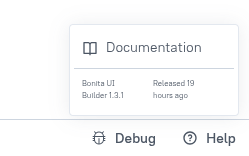
The release date is now displayed in the Help section of the Bonita UI Builder.
-
Is it now possible to configure the Bonita UI Builder to use a Redis Sentinel cluster for caching.
UI Builder 1.3.0 (2025-04-15)
New UI Builder Rest API for managing applications
In this release we are adding a new REST API, that lets you automatize some UI Builder actions with HTTP requests:
-
Import an application from a JSON application file
-
Import a set of applications from a zip file containing JSON application files
-
Delete all applications
Bug fixes
-
BPM-472: The Custom widget is missing in 1.2.0
-
BPM-492: JS onPageLoad and Theme update not working with UIB 1.2.x
UI Builder 1.2.0 (2025-02-18)
Here’s an overview of the enhancements (not an exhaustive list):
Enhancements in the JS and Query Editors
New Split View for both the JS editor and the Query editor is a major convenience upgrade.
It gives you an all-in-one workspace for writing and debugging code or queries while viewing the live, interactive UI on the same screen.
Moreover, the editors have been enhanced to let you open and manage multiple queries or JS editors in separate tabs within the same panel.
Widget UI Enhancements
Table Widget V2
-
In-line Editing: Edit cells directly in the table without extra forms.
-
New Column Types (e.g., image columns, switch columns) and custom renderers for advanced data display.
-
Server-Side Pagination with improved UI controls for large datasets (loading states, fetch-on-scroll, etc.).
Form Controls & Input Widgets
-
New or Enhanced Inputs: Phone input (with country selector), currency input, date pickers with better ranges.
-
More detailed inline validation messages (e.g., real-time email format checks).
-
Rich UI states for errors, disabled modes, and placeholders.
File/Media Widgets
-
Improved file picker widget with clearer drag-and-drop zones and progress indicators.
-
Advanced image widget properties (aspect ratio, object-fit, dynamic image resizing).
New Debug button
The New Debug button (located at the bottom-right corner of the editor) introduce a more centralized and intuitive debugging experience. When you click this button, a debug panel expands to display real-time logs, errors, and warnings generated by your widgets, queries, and JavaScript code. The State tab provides a real-time snapshot of the application’s current data and variables.
Bug fixes
This new version addressed a wide range of bugs and stability concerns. Notable fixes include:
-
Performance improvements (faster page loads, reduced memory usage).
-
UI refinements (better widget resizing/dragging, property pane cleanups).
-
Security enhancements (stricter session handling, refined authorization checks, and better data sanitization to prevent XSS).
-
Strengthened data source validation, ensuring unauthorized users couldn’t trigger or alter sensitive queries, and introduced more robust error handling to stop sensitive information from leaking into logs.